![Steno_Shield_Logo_White_Transparent-1.png]](https://help.steno.com/hs-fs/hubfs/Steno_Shield_Logo_White_Transparent-1.png?height=40&name=Steno_Shield_Logo_White_Transparent-1.png)
For any deposition where your firm has ordered both a transcript and Text-to-Video Sync (T2VS), you can now watch the synchronized video directly in Transcript Genius.
Note: You will still receive all your standard Text-to-Video Sync deliverables (PTX, WGN, LST files) for use in trial software. Video playback in Transcript Genius is an additional way to access your synced video.
Getting Started
There are two ways to access your synced video:
From the Job Materials page
-
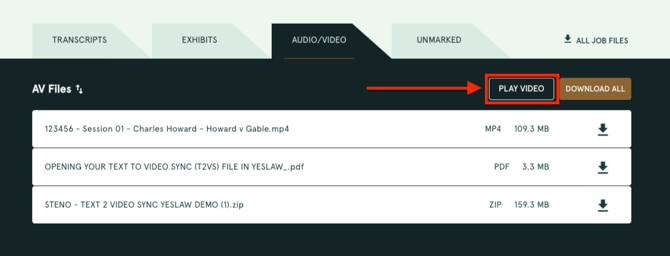
In the Audio/Video tab, look for the Play button on any job where you've ordered T2VS. Click it to open Transcript Genius with the video player ready to go.
From Transcript Genius
-
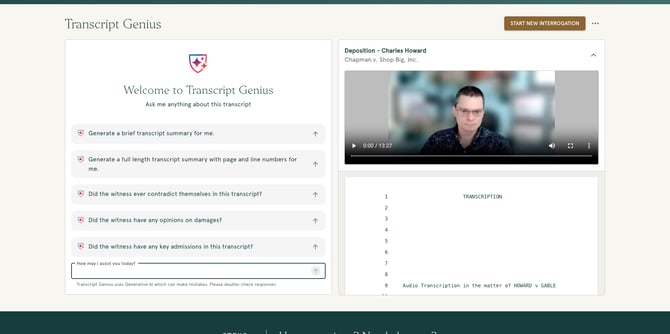
If you're already interrogating a transcript that has an associated T2VS order, the video player will appear automatically.
Using the Video Player
Once you're in, the video and transcript work together:
- Click any transcript line to jump the video to that exact moment and start playback.
- Scrub through the video and the transcript will scroll and highlight to follow along.
- Click a Transcript Genius citation to jump to the video for the first line of that excerpt.
The video player includes standard controls for play, pause, volume, and a scrubbable progress bar.
See it in Action
Historical Orders
If you ordered T2VS on a past job, those videos are available too. The first time you click Play on an older job, there may be a brief processing period while the video is prepared. Once it's ready, the player will load automatically.